Register    Login    Forum    Search    FAQ

Board index » Technical Talk » DIY


Post new topic Reply to topic  [ 11 posts ] 
Author Message
 Post Posted: 13 Aug 2012, 18:05 
Offline
Filter, Exhaust, Branch & Chip
User avatar

Joined: 02 Aug 2007, 12:09
Posts: 1097
Location: Milnerton
With the help of this guide you can convert your original Corsa C key to a flip carkey version.

Image
Requirements:

•Old key
•New flipkey (can be purchased through eBay: search for ‘flipkey vauxhall or opel’)
•Small Philips screwdriver
•2 to 3 different sizes of flatheaded screwdrivers
•1 or 2 new batteries (optional)
•Make sure you order the right keyblade as there are 2 version of the blade.
•Visit a local keymaker to fix you up with a nicely cut key.

Disassembly of your old key
1.

To get started disassemble you old key:

Image
For the most of you it’s clear to see in the picture how to disassemble the key but let’s put it in text anyway:
Carefully insert a flathead screwdriver into the notch and make a slighty downpressing and backward sliding motion.

2.

When you’ve done disassembling the key, there’s a small black block in the front of the casing at the keyblade’s side. This is the transponder which needs to be removed aswell.
It could be that the transponder has a tight fit to it. Carefully insert a small flathead screwdriver between the casing and the transponder and move the transponder inwards in the casing.
Image

3.

If everything went well the following parts are lying in front of you:

Image

4.

Now you need to open the body of the buttons. You do this by, again, inserting a small flatheaded screwdriver into the spot (as shown below) and giving it a gentle twist. By doing so, the casing opens up:

Image

5.

If the last step has worked out for you, the case has opened up and the following is lying in front of you:

Image

6.

In the picture above you can see that the PCB is held in place by 2 clips. If you can press 1 clip slightly sideways with a nail/flathead screwdriver you can use a corner of the PCB to flip it out of the housing. The battery can be removed with a small flathead:
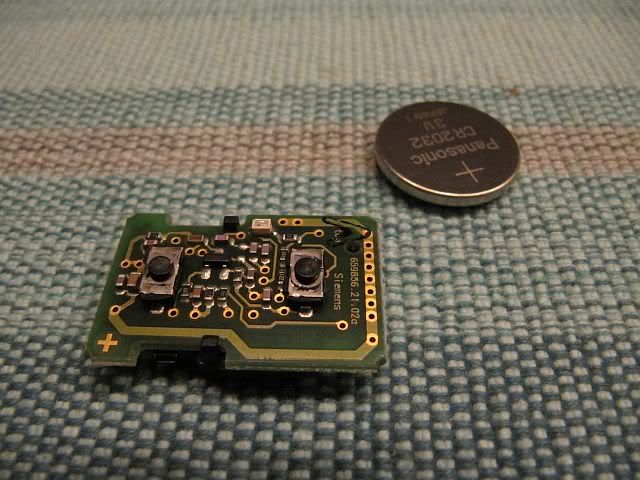
Image

7.

Then you’ll have to remove and transfer the battery clips aswell. The large clip can easily be removed by pushing it upwards with a screwdriver from the bottom of the casing:

Image

8.

The other clip is a bit harder to remove from the casing. What you do is bent the clip carefully a bit upwards as you can see in the picture below. At the next step you can see what to do after this:

Image

Make sure you do not bend to far otherwise the clip may break…!

9.

In the picture below you’ll see a notch in the mounting of the second battery clip. When you’ve bend up the clip, you’ll have to insert a small flathead into this narrow notch to release the little hooks which keep the clip into his mounting. When you’ve done this you can remove the clip out of his mounting:

Image

Again, be carefull not to break the clip…!

Conversion to the new flipkey casing

1.

Disassemble the new casing:

Image

2.

To start with, put the PCB in the shown position in his side of the casing:

Image

3.

Replace the battery clips again. Again as shown below. Remember to bend the clip back at the right side into his former position:

Image

Be carefull again not to break the clips…!

4.

Put the battery back into place in the casing:

Image

If neccessary, replace the battery for a new one…

5.

Place the spring over the pin with the long end at the bottom side towards you into the notch:

Image

7.

Place the button onto the spring with the 2 legs away from the casing:

Image

8.

Put the keyblade onto the button and hol dit into place at the 2 legs. Now turn the keyblade aprox. 1 turn counterclockwise. Make sure the spring stays into place. Doing so you’ll wind up the spring letting it flip the key when you push the button:

Image

Tip: Turn the blade twice. Doing so the key will flip out nicely and the spring won’t get to quickly ‘tired’ after a while…

9.

Now put the transponder into the casing. For this you’ll see a ‘container’ on the PCB side of the casing:

Image

There’s a slope side (if you call it that way) at the transponder. For a flush fit, put the transponder with the slope side facing downwards pointing to the outside of the casing.

10.

The last thing to do is closing the casing with the 3 screws provided and sticking the badge at the right spot:

Image

Your flip carkey conversion is now complete.
Test it to make sure everything is in working order.


I got my key off e-bay. I paid R280 including postage.
I'm very happy with it. Here is a link to where I got my key.
http://www.ebay.co.uk/itm/390401569575? ... 1497.l2649

_________________
ImageImage

Speed has never killed anyone.........Suddenly becoming stationary....... That's what gets you....!!! Jeremy Clarkson


Top 
 Profile  
 
 Post Posted: 13 Aug 2012, 22:10 
Offline
Filter, Exhaust, Branch & Chip
User avatar

Joined: 16 Aug 2008, 19:30
Posts: 2149
Very nice!

_________________
1996 200is 312000km,272 Kent cam,4-1branch, 57mm Powerflow exhaust, fully balanced bottom end, DIY ported
Short Shift mod

Complete with - cracked windscreen, fading boot spoiler + bumpers, melted fusebox, incorrect grill, no headliner,cracked front disks, warped rear, 1X buckled and scraped mag 2X buckled

Gomoto GT125 71000km, 7kw of frame bending power :-) Still the most reliable vehicle I have owned


Top 
 Profile  
 
 Post Posted: 15 Aug 2012, 09:30 
Offline
Filter, Exhaust, Branch & Chip
User avatar

Joined: 26 Oct 2011, 10:04
Posts: 1106
Location: Athlone
will this work for the old keys as well? my UTE doesnt have a key with the central locking and alarm buttons on i have a different remote for that but i would still like to do the conversion to the flip key...just for the fact that i want a flip key lol

_________________
Current
2008 Opel Corsa C UTE 1.4i
2x Pioneer Champion Series 10" DVC's
1x XTC 5000watt Monoblock
123db

2000 Opel Corsa B 1.4i

EX1997 VW Citi Golf (1.6i Polo Conversion)
1991 VW Citi Golf 1.3

Image
Image


Top 
 Profile  
 
 Post Posted: 20 Aug 2012, 08:14 
Offline
Filter, Exhaust, Branch & Chip
User avatar

Joined: 02 Aug 2007, 12:09
Posts: 1097
Location: Milnerton
Jay-C wrote:
will this work for the old keys as well? my UTE doesnt have a key with the central locking and alarm buttons on i have a different remote for that but i would still like to do the conversion to the flip key...just for the fact that i want a flip key lol


I think it can be done.
The central locking and alarm remote could be swopped over, depending on how the circuit board looks like and if it will fit.

_________________
ImageImage

Speed has never killed anyone.........Suddenly becoming stationary....... That's what gets you....!!! Jeremy Clarkson


Top 
 Profile  
 
 Post Posted: 20 Aug 2012, 08:35 
Offline
Opel Club Cape Town AFFILIATE

Joined: 17 Mar 2007, 21:10
Posts: 19329
Epic diy!

Ahuld be stikied

_________________
Current:
'13 Alfa Romeo MiTO Quadrifoglio Verde Sport 125kw 250nm
Dont take life so seriously

Swedish House Mafia- Greyhound

Ex:
'12 Fiat Bravo Sport 110kw 235nm
'11 Kia Koup 122kw 203nm
'08 Daihatsu Sirion Sport 1.5 VVTi
'02 Euro Opel Corsa 160is
'85 Opel GSI 2 door Boss


Top 
 Profile  
 
 Post Posted: 20 Aug 2012, 13:31 
Offline
Filter, Exhaust, Branch & Chip
User avatar

Joined: 26 Oct 2011, 10:04
Posts: 1106
Location: Athlone
Funnelman wrote:
Jay-C wrote:
will this work for the old keys as well? my UTE doesnt have a key with the central locking and alarm buttons on i have a different remote for that but i would still like to do the conversion to the flip key...just for the fact that i want a flip key lol


I think it can be done.
The central locking and alarm remote could be swopped over, depending on how the circuit board looks like and if it will fit.

ok cool thanks, i sent you a message on whatsapp with the pics of my key lol i didnt know what you ment earlier with the grooves...i also mailed the seller because the postage option i get doesnt include south africa

_________________
Current
2008 Opel Corsa C UTE 1.4i
2x Pioneer Champion Series 10" DVC's
1x XTC 5000watt Monoblock
123db

2000 Opel Corsa B 1.4i

EX1997 VW Citi Golf (1.6i Polo Conversion)
1991 VW Citi Golf 1.3

Image
Image


Top 
 Profile  
 
 Post Posted: 08 Apr 2013, 01:15 
Offline
Cruising with a Cone Filter

Joined: 17 Feb 2013, 17:30
Posts: 2
Happy to see that my tutorial is going around the world ...


Top 
 Profile  
 
 Post Posted: 08 Apr 2013, 09:55 
Offline
Filter, Exhaust, Branch & Chip
User avatar

Joined: 17 Apr 2011, 22:55
Posts: 2436
Location: ON THE STREETS OF CPT
Mastah-GSi wrote:
Happy to see that my tutorial is going around the world ...


Elaborate????? BTW a introduction would be nice just saying.

_________________
Image
:OpelLogo: :Calibra: 0kw 0Nm


Top 
 Profile  
 
 Post Posted: 06 Mar 2016, 13:23 
Offline
Cruising with a Cone Filter

Joined: 17 Feb 2013, 17:30
Posts: 2
This would it:

http://www.corsa-c.co.uk/forum/showthre ... conversion


Top 
 Profile  
 
 Post Posted: 14 Oct 2016, 15:22 
Offline
Cruising with a Cone Filter

Joined: 20 Sep 2016, 08:46
Posts: 11
How much was it to get the blade cut? can get this key on B O B (bid or buy) a company in DBN imports them R150 only pay R80 for courrier

http://www.bidorbuy.co.za/item/24773008 ... blank.html


Top 
 Profile  
 
 Post Posted: 18 Oct 2016, 07:32 
Offline
Filter, Exhaust, Branch & Chip
User avatar

Joined: 02 Aug 2007, 12:09
Posts: 1097
Location: Milnerton
Depends on where you have it done. Could be about R100 to have the key cut.

_________________
ImageImage

Speed has never killed anyone.........Suddenly becoming stationary....... That's what gets you....!!! Jeremy Clarkson


Top 
 Profile  
 
Display posts from previous:  Sort by  
 
Post new topic Reply to topic  [ 11 posts ] 

Board index » Technical Talk » DIY


Who is online

Users browsing this forum: No registered users and 2 guests


You cannot post new topics in this forum
You cannot reply to topics in this forum
You cannot edit your posts in this forum
You cannot delete your posts in this forum
You cannot post attachments in this forum

Search for:
Jump to: